


ServerLife - Tip Tracker
4.81.06K Reviews
App Specs
- Version
- 2.1.53
- Updated On
- License
- Free
- Downloads
- 100,000+
- Developer
- MZBApps LLC
- Categories
- Finance
- Platform
- Android
Screenshots
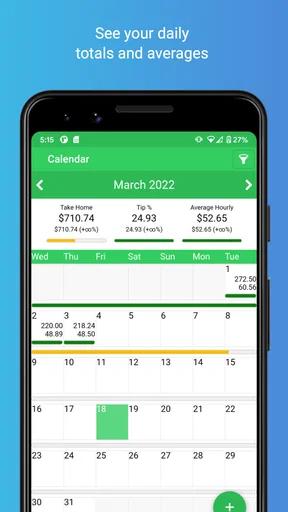
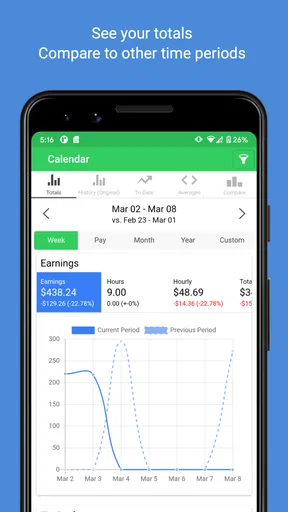
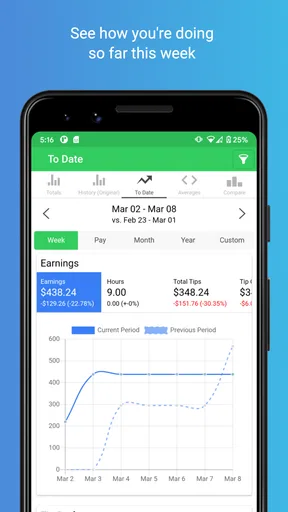
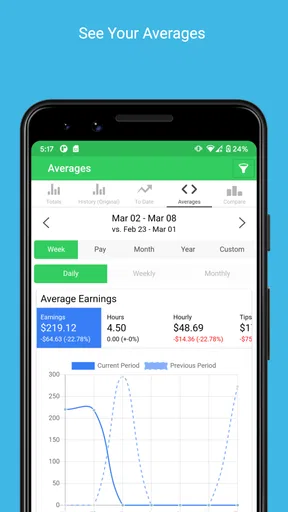
 Analysis by AppCompare
When tips arrive in different forms and on different shifts, it’s easy to finish a busy week unsure of what you actually earned. I like the idea behind ServerLife - Tip Tracker: put those scattered figures in one place, then use them to understand your income rather than relying on memory. That focus makes it more useful to me than a general budget app for people whose pay changes from shift to shift.
Why shift-by-shift tracking matters
Tip income can be hard to judge from a single good or bad night. Logging earnings alongside hours gives each shift more context: a large total may look different once you consider how long you worked, while a quieter shift may have paid better per hour than you expected. That comparison is the capability I’d build a habit around, because it turns a string of workdays into information you can actually use.
ServerLife is a free finance app from MZBApps LLC, aimed at servers, drivers, and other workers whose income includes tips. It has a 4.8 average from around 3.9 thousand ratings, and more than 100 thousand installs. The app is rated for everyone; it first appeared on April 4, 2016, and version 2.1.27 supports devices running Android 7.0 or later. Those details make it a well-established option to consider, though the practical question is whether you’ll enter each shift consistently enough to benefit from it.
Turning a shift into a useful record
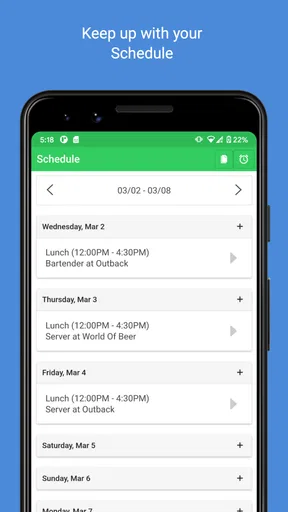
The basic routine is straightforward: after work, enter what you earned and the hours you worked. If your week includes more than one job, keeping those roles distinct can help you avoid treating unlike shifts as if they were the same. For instance, comparing a restaurant shift with a driving shift may show that one brings in more overall while the other pays better for the time spent. That distinction is more helpful than simply glancing at a combined total.
I’d make the entry part of closing out a shift, while the amounts are still fresh. If you wait until the end of the week, it becomes easier to forget a cash tip, mix up hours, or put an earning in the wrong place. A brief record after work is less demanding than trying to reconstruct several days at once, and it gives the weekly and longer-term views a better foundation.
For a realistic example, imagine working several evening shifts at a restaurant and picking up a driving shift on a day off. Recording the income and hours as you go gives you a way to see how each kind of work contributes. When you’re deciding whether to take another shift or protect a day for rest, that context is more useful than remembering only the busiest night. The app won’t make that decision for you, but a consistent log can make the trade-off clearer.
Adapting the record to irregular work
Pay periods don’t always line up neatly with the calendar, especially when someone has changing shifts or more than one source of tip income. Setting a weekly, bi-weekly, or monthly pay period helps the totals correspond to the rhythm you actually use to review your money. I’d choose the period that matches when you plan bills or check your earnings, rather than switching back and forth just to make a chart look tidy.
Worth Reading Before You Choose

EA SPORTS FC Mobile 26 Is a Bigger Football Game, but It Takes Time

Flipboard Shows What News Apps Must Do Beyond the Feed

Switching to Android Auto Means Rethinking Your Driving Routine

Google Calendar Makes a Crowded Week Easier to Manage

Ludo King Makes the Most of the Minutes Between Plans

Baby Panda World Brings Quick Play to Modern Phones, but Its Game Library Feels Busy
Separating cash, credit, and bonus tips can also make later reviews more informative. A combined figure tells you how much came in; categories give you a little more perspective on where it came from. The practical benefit is not that every entry needs elaborate bookkeeping. It’s that a small amount of consistency can make a later report more meaningful, particularly if your work mixes payment types or job roles.
There is a trade-off: useful tracking depends on accurate inputs. If you’re rushed after a shift, it’s tempting to skip a detail and promise yourself you’ll fill it in later. I’d keep the routine simple and record the figures you know, then correct anything you notice while the shift is still easy to remember. A tracker can organize information, but it can’t repair a habit of incomplete logging.
Using the records to make better decisions
I’d use the records to look for repeatable patterns, such as whether a particular kind of shift is consistently worth the time, rather than treating one strong night as a forecast. That makes the log more useful for choices about scheduling and cautious budgeting, while keeping the next section focused on how to read those patterns without overestimating what they promise.
Reading patterns instead of chasing one big night
Reports are most valuable when you use them to spot patterns, not to judge your finances by a single unusually strong shift. Looking over a longer stretch can help you see whether your income is generally steady, whether certain shifts tend to be worthwhile, or whether a change in schedule has affected your take-home tips. I’d treat those views as a prompt for questions, rather than as a guarantee of what the next week will bring.
That distinction matters when you budget. A high-earning week may feel like a new normal, but tip income can vary. Using a broader view to plan routine expenses is more cautious than building a budget around the best few shifts. If you’re saving for a trip or trying to set aside money, the record can help you understand what you’ve actually earned over time; it cannot ensure that future shifts will match it.
Where it fits alongside other money tools
A notes app or spreadsheet can also hold shift totals, and either may suit someone who wants complete control over columns and formulas. The downside is that you have to create and maintain the structure yourself. ServerLife is the more focused choice if your main question is how tips and hours add up across jobs and pay periods. A general budgeting app, by contrast, may be a better fit if you want to manage bills, balances, and household spending in one place.
I wouldn’t treat a tip tracker as a replacement for formal records needed for taxes, payroll, or workplace reporting. Its value is in helping you keep your own view of earnings organized. If you need a specific format for an employer or accountant, check that the records you keep meet that need before relying on an app report as your only documentation.
ServerLife can export reports, which may be useful when you prefer to keep a separate copy or discuss your earnings with an accountant. I’d still review a report before sharing it: make sure the dates and entries cover the period you intend, and keep your own records in a way that makes sense for your situation. Exporting is convenient, but it doesn’t remove the need to check your figures.
Costs, expectations, and practical limits
The app is free to download, with in-app purchases ranging from $0.99 to $19.99 per item. I’d try the basic tracking routine first and decide whether the way you use it justifies paying for any extras. That approach is sensible if you’re unsure how often you’ll log shifts; paying before you’ve built the habit won’t make the records more complete.
Another limitation is that a tracker is only as useful as the decisions you make from it. It can show earnings and hours, but your schedule, expenses, taxes, and personal goals still need your judgment. If your income is mostly a fixed salary and you rarely need to separate tips by shift or job, a standard budget tool may be simpler. Likewise, if you need automatic connections to accounts or a full household budget, choose a tool designed for those tasks instead of expecting a tip log to cover everything.
Privacy is worth considering whenever you store financial notes on a phone. I’d avoid entering details that aren’t necessary for tracking your shifts, and I’d make sure I understand my own device’s security settings. The app is meant to help organize income information; it shouldn’t be treated as a complete financial records system for every purpose.
Who is likely to get the most from it
I think ServerLife makes the most sense for servers, drivers, and other workers who regularly receive tips and want to compare income with time worked. It’s especially appealing if you juggle multiple jobs or have a pay cycle that doesn’t match a simple monthly budget. People who enjoy a quick after-shift routine can turn those small entries into a clearer picture of how their work is paying off.
It may not be the right fit if you dislike manual logging, have little tip income to track, or need a broad personal-finance dashboard rather than shift-level records. Before choosing it, ask yourself what decision you want the information to support: comparing jobs, understanding hourly earnings, or planning around variable pay. If none of those questions comes up often, a note or spreadsheet may be enough.
The first impression
Getting started with ServerLife is as easy as pie. After a quick download from the App Store, I was greeted with a clean and intuitive interface. No need for a tutorial; everything is straightforward and user-friendly. The app has a modern design that’s easy on the eyes, with navigation that’s as smooth as butter.
Tracking made simple
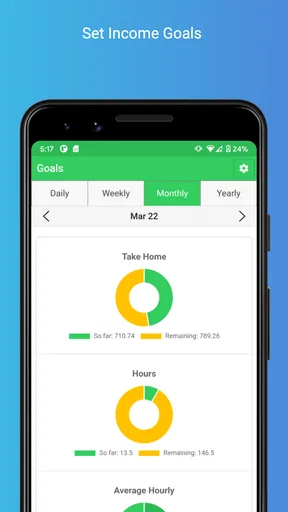
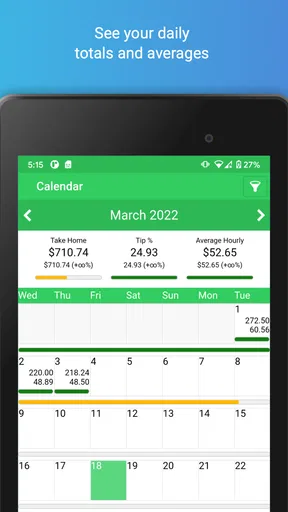
The core feature of this app is, of course, the ability to track your tips. You simply input your daily earnings, and the app does the rest. It calculates your weekly, monthly, and yearly earnings, offering a clear view of your financial progress. One thing I really appreciated was the ability to add multiple jobs. If you’re juggling gigs like a pro, this feature is a game-changer.
The app also lets you track your hours, so you can see exactly how much you’re making per hour. It’s a fantastic way to ensure you’re meeting your financial goals and staying on top of your game. And let’s be honest, who doesn’t love seeing those numbers add up?
Customization and flexibility
One of the standout features is the customization options. You can set your pay period, whether it’s weekly, bi-weekly, or monthly, and the app will adjust accordingly. This flexibility is perfect for anyone with a schedule that’s less predictable than a cat’s mood.
Additionally, the app allows you to categorize tips, making it easier to see where your money is coming from. Whether it’s cash, credit, or bonuses, you can log it all with ease. It’s like having a financial assistant in your pocket.
Data and insights
Now, let’s talk about the insights. The app generates detailed reports that help you analyze your earnings over time. These insights are invaluable for planning your budget, saving for that dream vacation, or simply understanding your financial habits better.
You can export these reports in various formats, which is great for those of us who like to keep a digital record or share with our accountants. The app gives you the power to take control of your financial destiny.
Security and privacy
In today’s digital age, security is paramount. I was pleased to find that the app takes privacy seriously. Your data is stored securely, and the app does not require unnecessary permissions that could compromise your personal information. It’s always reassuring to know your financial data is in safe hands.
A few things to consider
No app is perfect, and while ServerLife - Tip Tracker is fantastic, it’s worth noting that it’s not free. There’s a small fee to access all the features, but in my opinion, the benefits far outweigh the cost. If you’re serious about managing your tips efficiently, it’s a worthy investment.
The app is continually updated, and the developers are active in responding to user feedback. This ongoing support ensures that the app evolves with the needs of its users, which is always a plus in my book.
The final word
All in all, ServerLife - Tip Tracker is a gem for anyone in the service industry. It’s an intuitive, reliable, and comprehensive tool for tracking your tips and staying on top of your finances. With its user-friendly interface and powerful features, managing your money has never been easier.
If you’re looking to simplify your financial life and make every dollar count, give this app a try. After all, your hard work deserves the best management tool available. Happy tipping!
Pros
- Intuitive interface for easy navigation.
- Customizable tip categories and entries.
- Detailed analytics for income tracking.
- Supports multiple job profiles.
- Offline mode for tracking without internet.
Cons
- Limited features in free version.
- Occasional sync issues with cloud.
- Ads can be intrusive at times.
- No integration with payroll systems.
- Learning curve for new users.
FAQs for ServerLife - Tip Tracker
What is ServerLife - Tip Tracker and how does it work?
ServerLife - Tip Tracker is an app designed to help servers and bartenders keep track of their tips and earnings. Users can input their daily tips, hourly wages, and shifts to monitor their income trends. The app provides insights and analytics to help users understand their earning patterns over time.
Is ServerLife - Tip Tracker available on both Android and iOS?
Yes, ServerLife - Tip Tracker is available for download on both Android and iOS devices. Users can find it on the Google Play Store and the Apple App Store. The app is regularly updated to ensure compatibility and to add new features for both platforms.
Does ServerLife - Tip Tracker require an internet connection to function?
No, ServerLife - Tip Tracker does not require a constant internet connection. Users can input their data offline, and the app will sync when an internet connection is available. This ensures that servers can log their tips even in areas with limited connectivity.
Is my financial data secure in ServerLife - Tip Tracker?
ServerLife - Tip Tracker takes privacy and data security seriously. The app uses encryption to protect user data, and offers options for secure backup and restore. Users can also set up a passcode for additional security, ensuring that their financial information remains confidential.
Are there any costs associated with using ServerLife - Tip Tracker?
ServerLife - Tip Tracker offers both free and premium versions. The free version includes basic tracking features, while the premium version unlocks more advanced analytics and customization options. Users can choose a subscription plan that best fits their needs, with the details available within the app store description.


